Founder's checks
Five checks, in this order. Each is a numbered list of taps, then one line for Pass and one for Fail. If something fails, note the exact words on the screen and the time; that’s all anyone needs to look into it.
| # | Check | Wallet | About |
|---|---|---|---|
| A | The one-signature move (Bring liquidity) | Nautilus | 2 min |
| B | Sign a swap from your phone (ErgoPay QR code) | Phone | 2 min |
| C | Add liquidity with ERG only (the zap) | Nautilus | 2 min, plus a block’s wait |
| D | Create a pool | Nautilus | 2 min |
| E | Supply on lending from your phone (ErgoPay) | Phone | 3 min |
Before you start (2 min)
Section titled “Before you start (2 min)”You need a computer with Nautilus’s testnet build, and a phone with an Ergo mobile wallet that supports ErgoPay, on testnet.
- Test-pool LP for check A: your Nautilus wallet already holds 50,000,000 LP tokens of the test pool for this check (sent by kadia-labs). You don’t need to do anything for it.
- Coins: open the faucet and claim, each to the address shown:
| Claim | To | Gets you | Used in |
|---|---|---|---|
| ERG | your Nautilus address | 1,000 ERG | C, D and every fee |
| tUSE | your Nautilus address | 1,000 tUSE, with 0.5 ERG | D |
| ERG | your phone wallet’s address | 1,000 ERG | B |
| tUSE | your phone wallet’s address | 1,000 tUSE, with 0.5 ERG | E |
That’s four claims, within the faucet’s limit of 6 a day from one connection. Each address can claim each offer once every 24 hours.
A. The one-signature move (Nautilus, 2 min)
Section titled “A. The one-signature move (Nautilus, 2 min)”- Open the DEX’s Bring page, with
?try=direct. The?try=directpart turns the experimental button on for this browser tab only. - Tap Connect (top right), then Connect next to Nautilus, and approve in Nautilus. Under Your positions you see the test pool’s ERG / tUSE row with 50,000,000 LP.
- Tap Move in one signature (experimental). You see Review: move in one signature: You move 50,000,000 LP; what it redeems now, in ERG and tUSE; the Kadia LP expected and its minimum; what comes back unused; the network and miner fees; and Your wallet sends.
- Tap Sign with Nautilus, check that Nautilus shows the same amounts, and approve.
- The page says Sent. Your Kadia deposit order is …: find it in My orders. Open My orders: the deposit is listed, and once Kadia’s next batch adds it, your Kadia LP shows under My liquidity.
Pass: the Sent line at step 5, then the deposit in My orders, filled within a few blocks. Fail: a message instead of the review at step 3; Nautilus refusing to sign; or the deposit not appearing in My orders. If step 3 says “This pool was used in the last 30 blocks”, someone traded it just now: wait a few minutes and tap again. That’s not a fail.
B. Sign a swap from your phone (2 min)
Section titled “B. Sign a swap from your phone (2 min)”- On the computer, open the ERG / tUSE market. If Nautilus is connected, tap your address (top right) to disconnect it.
- Tap Connect. Under Mobile wallet · ErgoPay, tap Connect with ErgoPay. Scan the QR code with your phone wallet and approve sharing the address. The top right now shows your phone wallet’s address.
- In You sell, type 1 (ERG), and tap Review order. You see the swap’s review: what you sell, the expected tUSE and the minimum, and the fees.
- Tap Sign with ErgoPay. You see a QR code and Waiting for your wallet to send transaction …, with its id.
- Scan the QR code with the phone wallet. Above the QR code, the page says how your wallet will label the request (“Kadia transaction” when Kadia’s server checked it); the phone should show the same. Check that it sends 1 ERG plus the fees on the review, then approve.
- The computer says Sent. Transaction … waits for the next block.
Pass: the Sent line at step 6, and the tUSE arriving in the phone wallet within a block or two. Fail: no QR code at step 4 (a message instead), the phone wallet refusing the request, or amounts on the phone that differ from the review. A request is valid for a few blocks. If the page says it expired, tap Build a fresh request once and scan again; twice is a fail worth reporting.
C. Add liquidity with ERG only (Nautilus, 2 min plus a block)
Section titled “C. Add liquidity with ERG only (Nautilus, 2 min plus a block)”- Tap your phone wallet’s address (top right) to disconnect it, connect Nautilus again (as in A, step 2), and open the ERG / tUSE market’s Liquidity tab.
- Tap ERG only, type 1 in You add, and tap Review. You see Review step 1 of 2: the swap (below): about half the ERG is swapped for tUSE, and step 2 adds the rest with that tUSE.
- Tap Sign with Nautilus and approve.
- Open My orders. The ERG / tUSE: ERG only card says step 1 of 2. Once the swap fills (a block or two), tap Sign step 2: the deposit and approve.
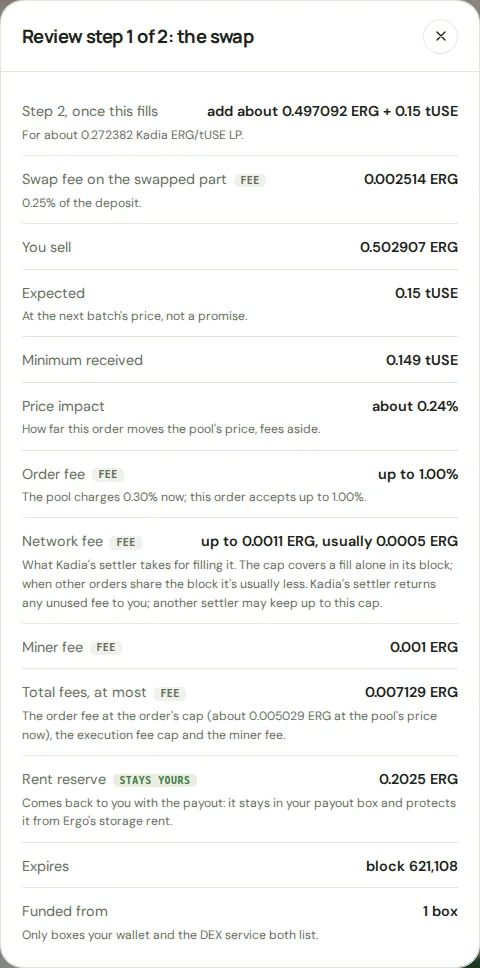
Live testnet, from a test wallet. Your figures differ with the pool’s price.
Pass: both steps sent, and Kadia ERG/tUSE LP under My liquidity after the deposit fills. Fail: a message instead of either review, a step that never fills, or no LP after the deposit fills. If the card says some ERG stayed in your wallet (the pool’s price band caps one swap), that’s expected, not a fail.
D. Create a pool (Nautilus, 2 min)
Section titled “D. Create a pool (Nautilus, 2 min)”This creates a second, community ERG / tUSE pool beside Kadia’s launch market. That’s allowed: Kadia checks a community pool was set up by the rules, not what its token is worth.
- Open Create a pool.
- In Token id, paste tUSE’s id:
477b40464c0aad56ff95401b2988f49580d1b951fe35fe325caae0f933c7af22. In ERG to put in, type 1. In tUSE to put in, type 1000. - Tap Review pool. You see Review creating a pool (below): You put in 1 ERG + 1,000 tUSE, You get about 30.58 Kadia ERG/tUSE LP, a small part of the supply locked in the pool for good, and 2 transactions.
- Tap Sign with Nautilus and approve the first transaction, then the second one straight after it.
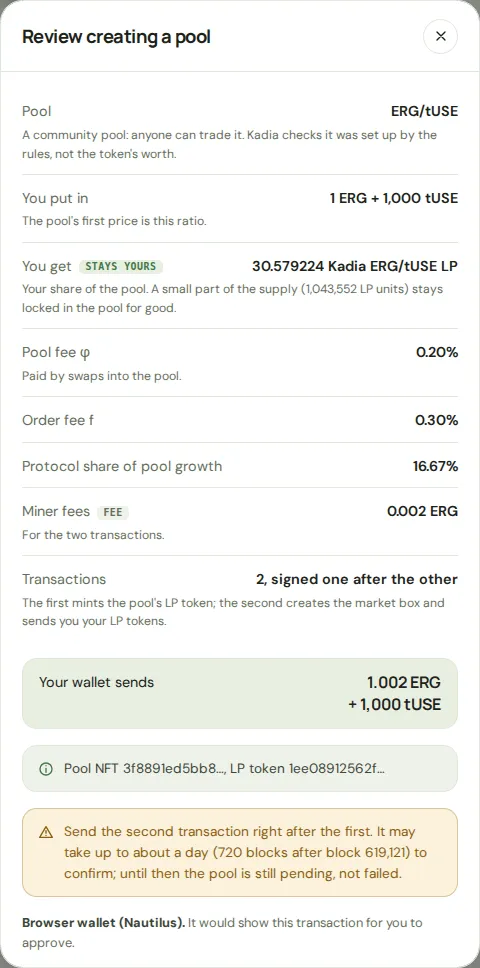
Live testnet, from a test wallet.
Pass: both transactions sent, and within a few blocks the new pool on the Pools page with the Community pool badge. Fail: a refusal at step 3, a second transaction that won’t send, or no new pool after about 10 blocks. This is the first community pool on today’s markets, so if it fails, the exact message matters most. A seed that’s too small is refused before anything is built, with “This seed is too small, or its price too lopsided, for the registry’s floors.” That’s expected for under about 0.34 ERG, not a fail.
E. Supply on lending from your phone (3 min)
Section titled “E. Supply on lending from your phone (3 min)”- On the computer, open Lending’s tUSE pool, Supply tab. Tap the Nautilus address (top right) to disconnect it, then connect your phone wallet as in B, step 2.
- Type 1 in You supply (tUSE) and tap Review supplying. You see Review supplying tUSE: You supply 1 tUSE; You receive about 1 share of the tUSE pool; Miner fee 0.0011 ERG; Your wallet sends 0.0011 ERG + 1 tUSE; Valid for about 5 blocks. If the pool is busy, the button says so and it can take a minute or two.
- Tap Sign with ErgoPay. You see a QR code and “Your wallet shows it as ‘Built by this page, not checked by Kadia’”.
- Scan it with the phone wallet. It shows the transaction as Built by this page, not checked by Kadia. Check that it sends 1 tUSE plus 0.0011 ERG, then approve.
- The page says Sent. Transaction … waits for the next block. Within a block or two, Lending’s Markets page shows it under Your lending: You supply about 1 tUSE.
Pass: the Sent line at step 5, then the supply under Your lending. Fail: no QR code at step 3 (a message instead), the phone wallet refusing the request, or amounts on the phone that differ from the review. One Build a fresh request (the request lasts about 5 blocks) is normal if you wait; twice is a fail worth reporting.
When you’re done
Section titled “When you’re done”Send the five results (pass, or the exact words of a fail) to kadia-labs. Nothing needs undoing: the coins have no value, and the pool, the LP and the supply can stay as they are.
Built with ♥ by kadia-labs